Connect Garmin
FitEdit can download your activities from Garmin Connect. It signs in with a Personal API key, which you create in Garmin Connect. The key lets FitEdit read your activities. It cannot change or delete them. FitEdit keeps the key encrypted on your computer and sends it only to Garmin.
The FitEdit desktop app can connect to Garmin. FitEdit in a web browser cannot.
Create a key
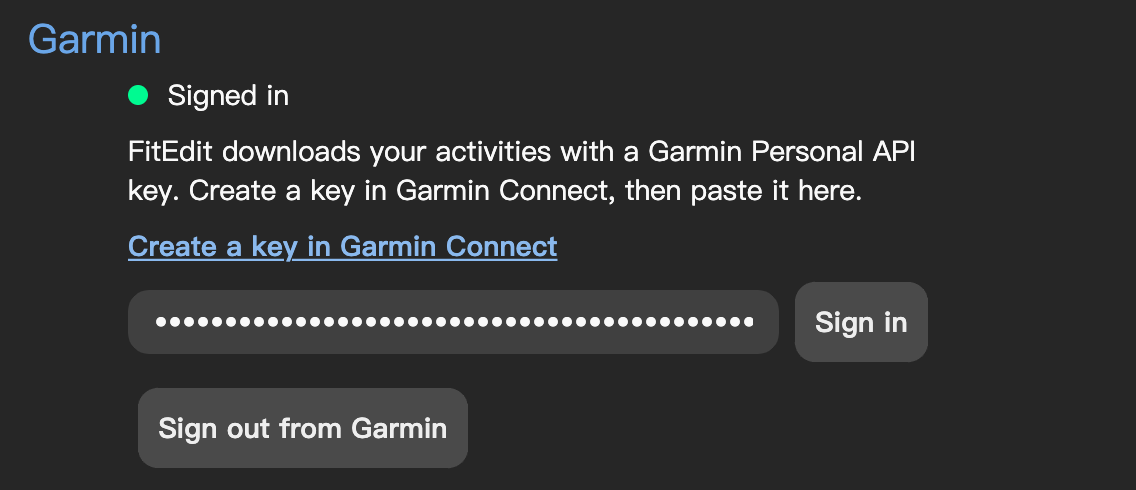
Step 1: In FitEdit, open Settings. Under Garmin, click Create a key in Garmin Connect. Your browser opens the Personal API key page in Garmin Connect. Sign in to Garmin Connect if it asks.
Step 2: Create a key and copy it. A key expires after 30 days to one year.
Enter the key
Step 3: In FitEdit, paste the key into the box under Garmin and click Sign in.
When it works, FitEdit shows Signed in.
If FitEdit shows Key expired or invalid, Garmin refused the key. Create a new key and enter it.
FitEdit remembers the key. To stop using it, click Sign out from Garmin.
Download your activities
Click the ⋮ button at the top left of the activity list, then Sync from Garmin. FitEdit downloads the activities that are newer than the newest one it has.
See Activities for the other sync options.
Next
Take a tour of the Overview.