Pool swims
Your watch counts pool lengths from your wrist. Sometimes it counts wrong. It can count two lengths where you swam one, or one where you swam two.
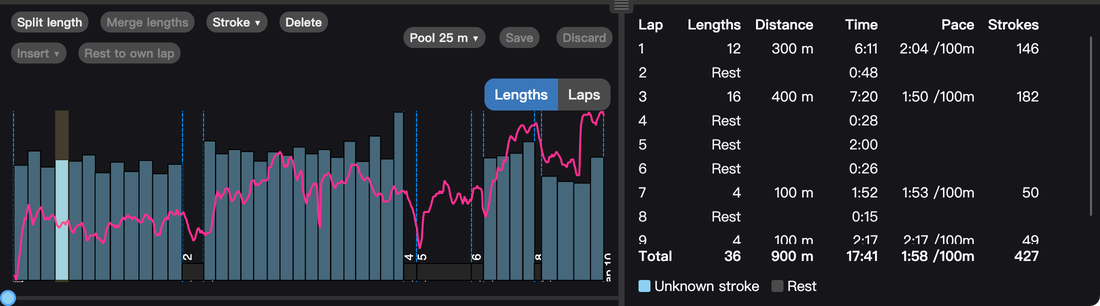
When you open a pool swim, FitEdit draws each length as a bar and lists the laps where the map would be.
Chart
Click Lengths or Laps to switch views.
In Lengths, each length is a bar. A taller bar is a faster length. Its color is its stroke, and the legend under the lap list names each color. Rests are dark. Point at a bar to see its lap, length, stroke, time, pace and strokes.
Click a bar to select a length. Shift-click to select a range of lengths in the same lap.
Lap list
Each row is a lap, with its lengths, distance, time, pace per 100 and strokes. A rest lap shows only its time. The totals are at the bottom.
Edit pool lengths
The buttons above the chart change the selected lengths.
- Split length makes one length into two. Use it when the watch missed a turn.
- Merge lengths makes two lengths next to each other into one. Use it when the watch counted a turn that did not happen.
- Stroke sets the stroke of the selected lengths to freestyle, backstroke, breaststroke, butterfly, drill or mixed.
- Delete removes the selected lengths.
- Insert adds a length at the start or end of the selected rest. Use it when you swam during what the watch thought was a rest.
- Rest to own lap moves the rests in a lap into a lap of their own.
You can also right-click a bar for the same edits.
FitEdit may suggest useful edits. To see them, click the suggestions button above the chart. For example, Split length 14 means length 14 looks like two lengths recorded as one. Click Apply to make that edit, or Apply all for every suggestion.
Pool length
If the pool length is wrong, such as a 25 yard pool recorded as 25 meters, click the Pool button. Enter the right length and unit, then click Set. FitEdit changes every distance and pace to match.
Save or discard
Length edits are not saved until you click Save. Until then, Undo and Redo step through them one at a time. Click Save to keep them all as one new version, or Discard to drop them.
Before you run another task, save or discard your length edits. If you close the tab first, FitEdit asks whether to save.
To set a lap’s distance in whole lengths, you can also use Lap distances.